
How to apply a discount code when shopping online in the UK

How to apply a discount code at checkout: step by step
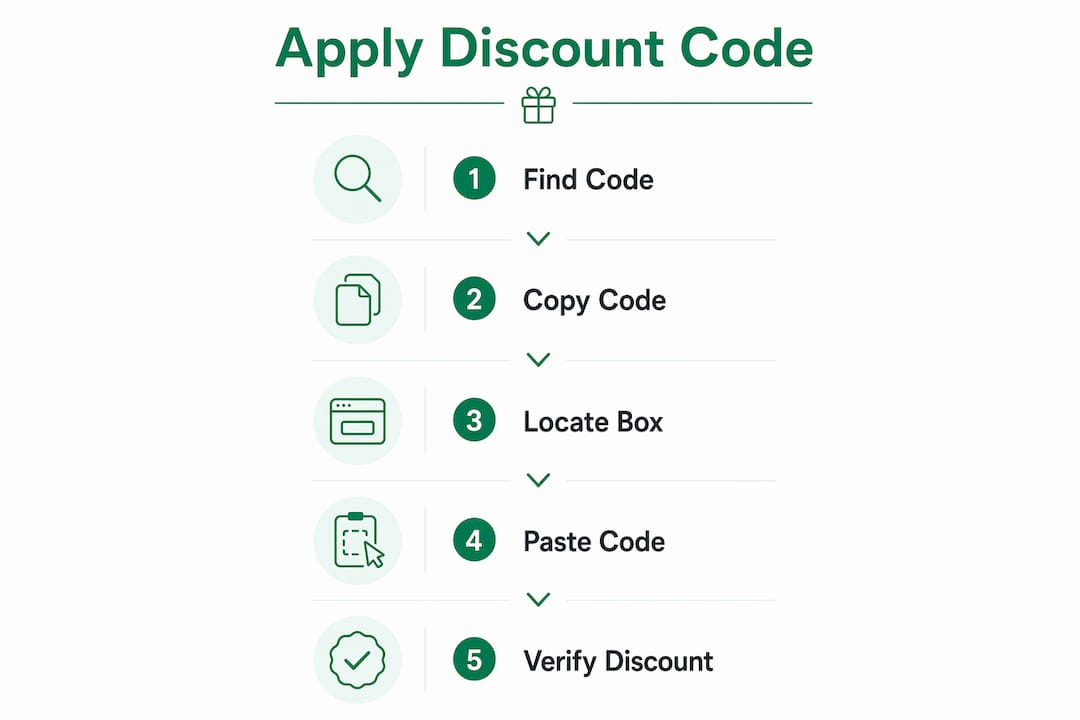
Applying a discount code is straightforward once you know where to look. Enter your code into the designated promo code box during checkout, click “Apply,” and confirm the price drops before you pay. That last step matters more than most shoppers realise.
Here is the full process:
- Find your code from a voucher site, promotional email, or retailer website before you start shopping.
- Add your items to the basket and proceed to the checkout or shopping cart page.
- Locate the promo code box — labelled “Discount Code,” “Promo Code,” “Voucher,” or “Coupon Code” depending on the retailer.
- Enter the code accurately. Many codes are case-sensitive, so type it exactly as shown or, better still, copy and paste it directly.
- Click “Apply” and watch the order total update. If the price does not change, the code has not been accepted.
- Verify the discount appears in your order summary before clicking “Pay Now” or “Place Order.”
Pro Tip: Copy and paste the code rather than typing it manually. Visually similar characters like “0” (zero) and “O” (letter) are a surprisingly common source of “Invalid Code” errors.
Table of Contents
- What’s the difference between a discount code, a voucher code and a promo code?
- Where to find the promo code box on a retailer’s website
- Using a discount code on mobile or in an app
- Common rules and restrictions you should know before using voucher codes
- Troubleshooting when your discount code will not apply
- Are voucher code sites and browser extensions safe to use?
- How Primevoucher helps you find verified discount codes for UK retailers
- Save more on every order with Primevoucher
- Frequently asked questions
- Key takeaways
What’s the difference between a discount code, a voucher code and a promo code?
In UK retail, “discount code”, “voucher code” and “promo code” are used more or less interchangeably to describe the same thing: a short string of letters and/or numbers, entered at checkout, that unlocks a saving. Retailers each favour slightly different wording on their own sites, but as a shopper you don’t need to treat them differently.
A code usually does one of the following:
- Takes a percentage or fixed amount off your order total
- Removes the delivery charge
- Unlocks a free gift or bonus item
- Gives buy-one-get-one-free (BOGOF) on selected products
- Rewards new customers with a one-off discount on their first order
One term that does work slightly differently is a “gift voucher,” which usually refers to a set monetary balance (physical or digital) rather than a percentage-off code — useful to know if a retailer’s help page uses the word “voucher” for both.

Where to find the promo code box on a retailer’s website
The promo code box is not always in an obvious spot, and its location varies by retailer. Knowing where to look saves you from completing a purchase at full price by accident.
Common locations and labels to watch for:
- Shopping cart or basket page — many retailers place the code field here, before you reach the payment screen.
- Checkout summary page — others show it alongside your order total, just above the payment button.
- Expandable or collapsible sections — some sites hide the field behind a small link or a “+” icon labelled “Have a promo code?” or similar.
- Labels vary widely — look for “Promo Code,” “Discount Code,” “Voucher,” “Coupon Code,” or simply “Code.” The promo code box may sit inside a dropdown rather than being visible by default.
If you cannot spot the field, use your browser’s built-in search function. Press Ctrl+F on Windows or Cmd+F on Mac and type “promo,” “voucher,” or “code.” This browser search technique surfaces hidden fields that are tucked behind menus or small clickable links.
Pro Tip: If you reach the final payment screen and there is no code box in sight, do not pay yet. Navigate back to your Shopping Bag or Cart Summary page — that is usually where the field appears.
Using a discount code on mobile or in an app
On a phone, the discount code field is sometimes hidden inside a collapsible “Order summary” section rather than sitting in plain view, so you may need to tap to expand it. In a retailer’s app, the field often only appears once you reach the final payment screen rather than earlier in the basket — so if you can’t find it straight away, keep going through checkout until you reach the last step rather than assuming the retailer doesn’t accept codes at all.
A couple of mobile-specific habits are worth building in: type slowly and double-check autocorrect hasn’t altered the code, and, where possible, copy the code from your email or notes app rather than retyping it from memory.

Common rules and restrictions you should know before using voucher codes
Discount codes come with conditions, and checking them before you shop saves a lot of frustration. Retailers set these rules to control how and when offers apply.
- Sale item exclusions. Many codes exclude already-discounted items, gift cards, or specific high-demand brand collaborations. A code that works on full-price clothing may not apply to a clearance rail.
- Minimum spend thresholds. A code may only activate once your basket reaches a set value. Falling short of that total means the code is rejected at checkout.
- One code per order. Most retailers allow only one discount code per transaction. Attempting to stack two codes typically triggers an error — though a code can often still be combined with a separate cashback offer, since cashback is tracked after your order rather than applied at checkout.
- Expiry dates. Codes carry a fixed end date. An expired code will not apply, even if it worked perfectly last week.
- Usage limits. Some codes are single-use or capped at a set number of redemptions across all customers.
- Delivery or region restrictions. Some UK retailer codes are limited to UK mainland delivery and exclude Northern Ireland or the Channel Islands — worth checking if a code fails specifically at the delivery stage.
- Terms and conditions apply. Always read the small print linked to the offer before adding items to your basket. Eligibility rules are stated there.
If you’re a student, teacher, or NHS worker, it’s also worth checking dedicated discount schemes before reaching for a general code — see our guides to student and teacher discount codes and NHS discount codes, which are often more generous and can sometimes be used alongside a sale price.
Troubleshooting when your discount code will not apply
A code that refuses to work is rarely a mystery. Most rejections come down to a handful of fixable issues.
- Check for extra spaces. Even one leading or trailing space is treated as part of the code by most systems, causing an “Invalid Code” error. Copy and paste rather than typing to avoid this.
- Confirm case sensitivity. Codes are often case-sensitive. “SAVE20” and “save20” may behave differently depending on the retailer.
- Verify the expiry date. If the code has passed its end date, it will not work regardless of how accurately you enter it.
- Check item eligibility. If your basket contains excluded products — sale items, gift cards, or certain brands — the code may be rejected even though it is otherwise valid.
- Read the error message. Retailers usually display a reason: “Code expired,” “Minimum spend not met,” or “Not applicable to selected items.” That message tells you exactly what to fix.
- Return to the cart page. If you are at the final payment step and there is no code field, go back to your basket. The promo box often only appears at the cart or order summary stage.
- Try a different browser or device. Occasionally a browser extension or autofill setting interferes with the code field. A quick switch usually resolves it.
Are voucher code sites and browser extensions safe to use?
Established UK voucher sites are generally safe, since they simply list codes that retailers have already made public. The bigger thing to be sensible about is browser extensions that claim to “auto-apply” codes at checkout. Before installing one, check what permissions it’s asking for — an extension that wants to read and change everything on every website you visit is asking for more access than it strictly needs just to fill in a discount box. Sticking to well-known, established tools, and removing extensions you’re not actively using, is a reasonable rule of thumb.
It’s also worth being wary of codes shared outside official retailer or voucher-site channels — for example in random social media comments or unsolicited emails — as these are occasionally used to direct shoppers to fake checkout pages rather than genuine retailer sites.
How Primevoucher helps you find verified discount codes for UK retailers
Finding a working code is half the battle. Primevoucher is a UK-based voucher platform that verifies discount codes and deals from trusted retailers across fashion, footwear, electronics, travel, pet supplies, and more. Rather than hunting across dozens of retailer sites, you get current, tested codes in one place.
What Primevoucher offers:
- Verified codes checked against live retailer offers, reducing the chance of landing on an expired or invalid code.
- Sector-wide coverage spanning fashion, electronics, supermarkets, children’s products, and travel — so there is usually something relevant regardless of what you are buying.
- Shopping guides and tips written specifically for UK consumers, helping you get more from each purchase.
- Daily updated deals so the codes you see reflect what is actually active right now.
Pro Tip: Bookmark Primevoucher and check it before you start shopping, not after you have already reached the checkout. You will have the code ready to paste in before you even add items to your basket.
Save more on every order with Primevoucher
Knowing how to redeem a voucher code is only useful when the code itself is valid. That is where Primevoucher makes a real difference for UK shoppers.
Primevoucher aggregates verified voucher codes and exclusive deals from trusted UK retailers, so you are not wasting time on codes that expired three months ago. Whether you are shopping for clothing, electronics, or everyday essentials, the platform gives you a single, reliable starting point. No guesswork, no dead ends at checkout.
Visit Primevoucher before your next online shop and grab a verified code before you even open the retailer’s website. That way, the discount is ready to apply the moment you reach the checkout.
Frequently asked questions
Can I use two discount codes on the same order?
Usually not. Most checkouts are built to accept a single code per order, so if you have more than one, it’s worth working out which gives you the better overall saving before you check out.
Do discount codes expire?
Most do, and some expire much sooner than they appear to — flash or influencer codes in particular can be valid for as little as a day. Always check the date a code was published before relying on it.
Are discount codes free to use?
Yes. A genuine discount code costs nothing beyond the price of what you’re buying — you’re never asked to pay to “unlock” one on a legitimate site.
Can I apply a discount code after I’ve already paid?
Almost never. Discounts need to be applied before payment is completed, so it’s worth pausing at checkout to double-check for a valid code rather than trying to apply one after the fact.
Do discount codes work on sale or clearance items?
Often not — retailers frequently exclude already-reduced stock from further discounts, and this is usually stated in the code’s terms.
Key takeaways
Applying a discount code successfully comes down to entering it accurately in the right place at checkout and verifying the price reduction before you pay.
| Point | Details |
|---|---|
| Enter the code accurately | Copy and paste to avoid case errors and stray spaces that trigger “Invalid Code” rejections. |
| Find the code box early | The promo field is usually on the cart or checkout summary page, sometimes hidden behind a collapsible link, and on mobile it may only appear at the final payment step. |
| Check the terms first | Codes often exclude sale items, require a minimum spend, and allow only one code per order — though cashback can usually still be combined. |
| Troubleshoot methodically | Read the error message, confirm expiry, and check item eligibility before assuming the code is broken. |
| Stick to reputable sources | Use established voucher sites and be cautious with browser extensions that request broad permissions. |
| Use Primevoucher for verified codes | Primevoucher lists current, tested UK discount codes across fashion, electronics, travel, and more. |